无来

不管你来还是不来
我都在这里,夜夜点亮
不是为了守候
只是为了做好我自己

0%

环境:centos 7 x86_64,php 7.1.7, MariaDB 10.1.23

一,下载sphinx,scws相关包

sphinx下载地址:http://sphinxsearch.com/downloads/release/

sphinx php扩展下载地址:http://pecl.php.net/package/sphinx

scws下载地址:http://www.xunsearch.com/scws/download.php

scws词库下载地址:http://www.xunsearch.com/scws/down/scws-dict-chs-utf8.tar.bz2

二,安装sphinx,scws,以及php扩展

  • 1,安装sphinx
    1
    2
    3
    4
    5
    # curl http://sphinxsearch.com/files/sphinx-2.3.1-beta.tar.gz
    # tar zxvf sphinx-2.3.1-beta.tar.gz
    # cd sphinx-2.3.1-beta
    # ./configure --prefix=/usr/local/sphinx --with-mysql=/usr/local/mariadb LIBS=-liconv
    # make && make install
  • 2,安装sphinx客户端
    1
    2
    3
    # cd api/libsphinxclient   //sphinx-2.3.1-beta目录下  
    # ./configure --prefix=/usr/local/sphinx/libsphinxclient
    # make && make install
  • 3,安装sphinx php扩展
1
2
3
4
5
6
# git clone https://github.com/php/pecl-search_engine-sphinx.git  
# cd pecl-search_engine-sphinx
# git checkout php7
# phpize
# ./configure --with-sphinx=/usr/local/sphinx/libsphinxclient --with-php-config=/usr/local/php/bin/php-config
# make && make install
  • 4,安装scws
1
2
3
4
5
6
7
# cd /usr/local/src  
# wget http://www.xunsearch.com/scws/down/scws-1.2.3.tar.bz2
# tar xvjf scws-1.2.3.tar.bz2
# mkdir /usr/local/scws
# cd scws-1.2.3
# ./configure --prefix=/usr/local/scws/
# make && make install
  • 5,安装scws php扩展
1
2
3
4
5
# cd /usr/local/src/sphinx/scws-1.2.3/phpext    
# phpize
# ./configure --with-php-config=/usr/local/php/bin/php-config
# make && make install

  • 6 安装scws词库
1
2
3
4
5
# wget http://www.xunsearch.com/scws/down/scws-dict-chs-utf8.tar.bz2
# tar xvjf scws-dict-chs-utf8.tar.bz2 -C /usr/local/scws/etc/

# www为php-fpm运行用户
# chown www:www /usr/local/scws/etc/dict.utf8.xdb

在这里一定要加权限,也就是说让php-fpm或者php-cgi的运行用户,拥有dict.utf8.xdb的所有权限。如果不这么做的话,php 扩展调用词库会报如下错误:

1
Warning: SimpleCWS::add_dict(): Failed to add the dict file

怎么查看php-fpm,php-cgi的运行用户呢?

1
2
3
4
5
6
7
8
9
10
11
12
# ps aux |grep php-fpm  
[www@localhost src]$ ps aux |grep php-fpm
www 51250 0.0 0.0 103340 912 pts/0 S+ 11:35 0:00 grep php-fpm
root 102701 0.0 0.0 256360 7064 ? Ss Jan23 0:07 php-fpm: master process (/usr/local/php/etc/php-fpm.conf)
www 102702 0.0 0.0 259536 12332 ? S Jan23 0:00 php-fpm: pool //使用php的用户 www
www 102703 0.0 0.0 259316 11792 ? S Jan23 0:00 php-fpm: pool www
www 102704 0.0 0.0 261576 14060 ? S Jan23 0:00 php-fpm: pool www
www 102705 0.0 0.0 259304 11852 ? S Jan23 0:00 php-fpm: pool www
www 102706 0.0 0.0 259128 12016 ? S Jan23 0:00 php-fpm: pool www
www 102707 0.0 0.0 259400 12100 ? S Jan23 0:00 php-fpm: pool www
www 102708 0.0 0.0 259296 12092 ? S Jan23 0:00 php-fpm: pool www

三,配置sphinx,scws,php等

  • 1,创建测试表和数据 test.sql
1
2
3
4
5
6
7
8
9
10
11
12
13
14
15
16
17
18
19
20
21
22
23
24
25
26
27
28
29
30
31
32
33
34
35
36
37
38
39
40
41
42
43
44
45
46
47
48
49
50
51
52
53
54
55
56
test.sql
/*
Navicat MySQL Data Transfer

Source Server : 192.168.101.130
Source Server Version : 50527
Source Host : 192.168.101.130:3306
Source Database : test

Target Server Type : MYSQL
Target Server Version : 50527
File Encoding : 65001

Date: 2016-08-14 13:46:48
*/

SET FOREIGN_KEY_CHECKS=0;

-- ----------------------------
-- Table structure for `userinfo`
-- ----------------------------
DROP TABLE IF EXISTS `userinfo`;
CREATE TABLE `userinfo` (
`id` int(11) unsigned NOT NULL AUTO_INCREMENT,
`userid` int(11) unsigned NOT NULL DEFAULT '0',
`addtime` datetime NOT NULL,
`post` varchar(20) NOT NULL DEFAULT '',
`summary` text NOT NULL,
PRIMARY KEY (`id`)
) ENGINE=InnoDB AUTO_INCREMENT=21 DEFAULT CHARSET=utf8;

-- ----------------------------
-- Records of userinfo
-- ----------------------------
INSERT INTO `userinfo` VALUES ('17', '1', '2012-06-01 00:24:54', '洪', '奥运');
INSERT INTO `userinfo` VALUES ('18', '2', '2014-08-19 10:24:54', '中国人', '洪荒');
INSERT INTO `userinfo` VALUES ('19', '3', '2015-08-01 12:24:54', '洪荒之', 'nimne');
INSERT INTO `userinfo` VALUES ('20', '4', '2013-08-01 00:24:54', '洪荒之力', '23金');

-- ----------------------------
-- Table structure for `users`
-- ----------------------------
DROP TABLE IF EXISTS `users`;
CREATE TABLE `users` (
`id` int(11) unsigned NOT NULL AUTO_INCREMENT,
`username` varchar(20) NOT NULL DEFAULT '',
PRIMARY KEY (`id`)
) ENGINE=InnoDB AUTO_INCREMENT=5 DEFAULT CHARSET=utf8;

-- ----------------------------
-- Records of users
-- ----------------------------
INSERT INTO `users` VALUES ('1', 'zhangsan');
INSERT INTO `users` VALUES ('2', 'zhangsi');
INSERT INTO `users` VALUES ('3', '李四');
INSERT INTO `users` VALUES ('4', '王五');

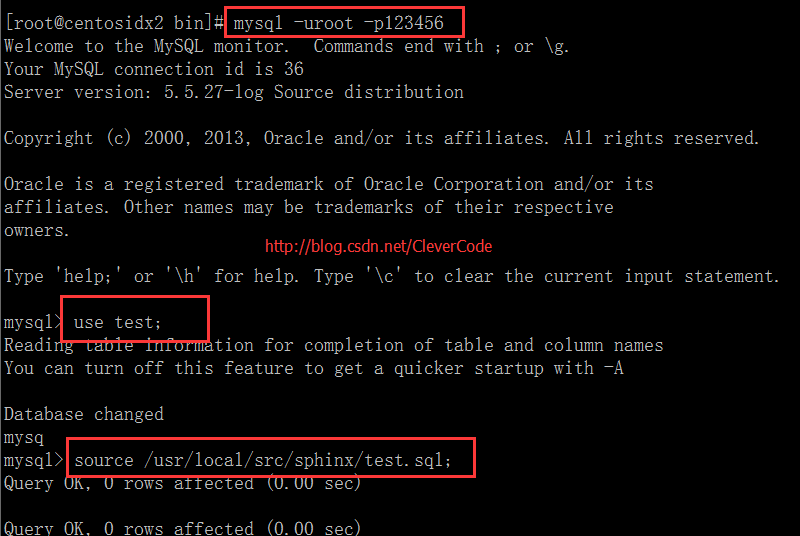
导入数据 source test.sql

数据源

1
2
3
4
5
6
7
8
9
10
11
12
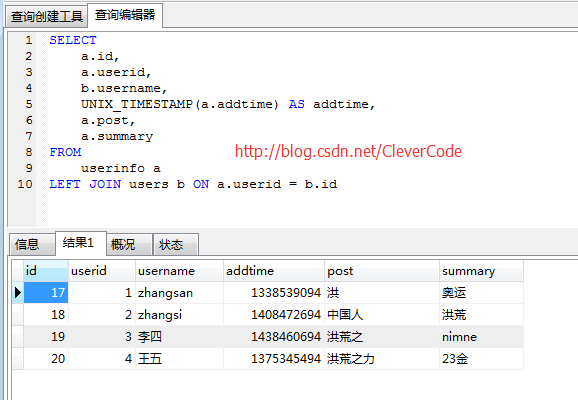
select
a.id,
a.userid,
b.username,
UNIX_TIMESTAMP(a.addtime) AS addtime,
a.post,
a.summary

FROM
userinfo a

LEFT JOIN users b ON a.userid = b.id
1
2
3
4
5
6
7
8
9
+----+--------+----------+------------+--------------+---------+
| id | userid | username | addtime | post | summary |
+----+--------+----------+------------+--------------+---------+
| 17 | 1 | zhangsan | 1338481494 | 洪 | 奥运 |
| 18 | 2 | zhangsi | 1408415094 | 中国人 | 洪荒 |
| 19 | 3 | 李四 | 1438403094 | 洪荒之 | nimne |
| 20 | 4 | 王五 | 1375287894 | 洪荒之力 | 23金 |
+----+--------+----------+------------+--------------+---------+

  • 2,配置sphinx.conf,加上以下内容
    其中searchd 以下3个配置比较重要。mysql -h0 -P 9306访问。9312可以给php访问。query_log_format 记录日志的格式。

  • 1 # php
    listen = 9312

  • 2 # mysql
    listen = 9306:mysql41

  • 3 # log_format

    query_log_format = sphinxql

  • sphinx.conf

1
2
3
4
5
6
7
8
9
10
11
12
13
14
15
16
17
18
19
20
21
22
23
24
25
26
27
28
29
30
31
32
33
34
35
36
37
38
39
40
41
42
43
44
45
46
47
48
49
50
51
52
53
54
55
56
57
58
59
60
61
62
63
64
65
66
67
68
69
70
71
72
73
74
75
# vim /usr/local/sphinx/etc/sphinx-test.conf

source users
{
type = mysql
sql_host = 127.0.0.1
sql_user = root
sql_pass = 123456
sql_db = test
sql_port = 3306 # optional, default is 3306
sql_query_pre = SET NAMES utf8
sql_query_pre = SET SESSION query_cache_type=OFF
sql_query = SELECT a.id, a.userid,b.username, UNIX_TIMESTAMP(a.addtime) AS addtime, a.post, a.summary FROM userinfo a left join users b on a.userid = b.id
sql_attr_uint = userid
sql_field_string = username
sql_field_string = post
sql_attr_timestamp = addtime
sql_ranged_throttle = 0
#sql_attr_uint = group_id
#sql_attr_timestamp = date_added
#sql_ranged_throttle = 0
}
source src1throttled : users
{
sql_ranged_throttle = 100
}

index users
{
source = users
path = /usr/local/sphinx/var/data/users
docinfo = extern
mlock = 0
morphology = none
min_word_len = 1
html_strip = 1
charset_table = U+FF10..U+FF19->0..9, 0..9, U+FF41..U+FF5A->a..z, U+FF21..U+FF3A->a..z,A..Z->a..z, a..z, U+0149, U+017F, U+0138, U+00DF, U+00FF, U+00C0..U+00D6->U+00E0..U+00F6,U+00E0..U+00F6, U+00D8..U+00DE->U+00F8..U+00FE, U+00F8..U+00FE, U+0100->U+0101, U+0101,U+0102->U+0103, U+0103, U+0104->U+0105, U+0105, U+0106->U+0107, U+0107, U+0108->U+0109,U+0109, U+010A->U+010B, U+010B, U+010C->U+010D, U+010D, U+010E->U+010F, U+010F,U+0110->U+0111, U+0111, U+0112->U+0113, U+0113, U+0114->U+0115, U+0115, U+0116->U+0117,U+0117, U+0118->U+0119, U+0119, U+011A->U+011B, U+011B, U+011C->U+011D, U+011D,U+011E->U+011F, U+011F, U+0130->U+0131, U+0131, U+0132->U+0133, U+0133, U+0134->U+0135,U+0135, U+0136->U+0137, U+0137, U+0139->U+013A, U+013A, U+013B->U+013C, U+013C,U+013D->U+013E, U+013E, U+013F->U+0140, U+0140, U+0141->U+0142, U+0142, U+0143->U+0144,U+0144, U+0145->U+0146, U+0146, U+0147->U+0148, U+0148, U+014A->U+014B, U+014B,U+014C->U+014D, U+014D, U+014E->U+014F, U+014F, U+0150->U+0151, U+0151, U+0152->U+0153,U+0153, U+0154->U+0155, U+0155, U+0156->U+0157, U+0157, U+0158->U+0159, U+0159,U+015A->U+015B, U+015B, U+015C->U+015D, U+015D, U+015E->U+015F, U+015F, U+0160->U+0161,U+0161, U+0162->U+0163, U+0163, U+0164->U+0165, U+0165, U+0166->U+0167, U+0167,U+0168->U+0169, U+0169, U+016A->U+016B, U+016B, U+016C->U+016D, U+016D, U+016E->U+016F,U+016F, U+0170->U+0171, U+0171, U+0172->U+0173, U+0173, U+0174->U+0175, U+0175,U+0176->U+0177, U+0177, U+0178->U+00FF, U+00FF, U+0179->U+017A, U+017A, U+017B->U+017C,U+017C, U+017D->U+017E, U+017E, U+0410..U+042F->U+0430..U+044F, U+0430..U+044F,U+05D0..U+05EA, U+0531..U+0556->U+0561..U+0586, U+0561..U+0587, U+0621..U+063A, U+01B9,U+01BF, U+0640..U+064A, U+0660..U+0669, U+066E, U+066F, U+0671..U+06D3, U+06F0..U+06FF,U+0904..U+0939, U+0958..U+095F, U+0960..U+0963, U+0966..U+096F, U+097B..U+097F,U+0985..U+09B9, U+09CE, U+09DC..U+09E3, U+09E6..U+09EF, U+0A05..U+0A39, U+0A59..U+0A5E,U+0A66..U+0A6F, U+0A85..U+0AB9, U+0AE0..U+0AE3, U+0AE6..U+0AEF, U+0B05..U+0B39,U+0B5C..U+0B61, U+0B66..U+0B6F, U+0B71, U+0B85..U+0BB9, U+0BE6..U+0BF2, U+0C05..U+0C39,U+0C66..U+0C6F, U+0C85..U+0CB9, U+0CDE..U+0CE3, U+0CE6..U+0CEF, U+0D05..U+0D39, U+0D60,U+0D61, U+0D66..U+0D6F, U+0D85..U+0DC6, U+1900..U+1938, U+1946..U+194F, U+A800..U+A805,U+A807..U+A822, U+0386->U+03B1, U+03AC->U+03B1, U+0388->U+03B5, U+03AD->U+03B5,U+0389->U+03B7, U+03AE->U+03B7, U+038A->U+03B9, U+0390->U+03B9, U+03AA->U+03B9,U+03AF->U+03B9, U+03CA->U+03B9, U+038C->U+03BF, U+03CC->U+03BF, U+038E->U+03C5,U+03AB->U+03C5, U+03B0->U+03C5, U+03CB->U+03C5, U+03CD->U+03C5, U+038F->U+03C9,U+03CE->U+03C9, U+03C2->U+03C3, U+0391..U+03A1->U+03B1..U+03C1,U+03A3..U+03A9->U+03C3..U+03C9, U+03B1..U+03C1, U+03C3..U+03C9, U+0E01..U+0E2E,U+0E30..U+0E3A, U+0E40..U+0E45, U+0E47, U+0E50..U+0E59
ngram_len = 1
ngram_chars = U+4E00..U+9FBF, U+3400..U+4DBF, U+20000..U+2A6DF, U+F900..U+FAFF,U+2F800..U+2FA1F, U+2E80..U+2EFF, U+2F00..U+2FDF, U+3100..U+312F, U+31A0..U+31BF,U+3040..U+309F, U+30A0..U+30FF,U+31F0..U+31FF, U+AC00..U+D7AF, U+1100..U+11FF,U+3130..U+318F, U+A000..U+A48F, U+A490..U+A4CF

}
common
{
}
indexer
{
mem_limit = 128M
}
searchd
{

#php
listen = 9312

#mysql
listen = 9306:mysql41

log = /usr/local/sphinx/var/log/searchd.log
query_log = /usr/local/sphinx/var/log/query.log
query_log_format = sphinxql
read_timeout = 5
client_timeout = 300
max_children = 30
persistent_connections_limit = 30
pid_file = /usr/local/sphinx/var/log/searchd.pid
seamless_rotate = 1
preopen_indexes = 1
unlink_old = 1
mva_updates_pool = 1M
max_packet_size = 8M
max_filters = 256
max_filter_values = 4096
max_batch_queries = 32
workers = threads # for RT to work
}

4,配置php.ini

1
2
3
4
5
6
7
8
# vim /etc/php.ini  
[sphinx]
extension = sphinx.so

[scws]
extension = scws.so
scws.default.charset = utf-8
scws.default.fpath = /usr/local/scws/etc

四,启动sphinx,php-fpm

  • 1,启动sphinx
    1
    2
    # /usr/local/sphinx/bin/indexer --config /usr/local/sphinx/etc/sphinx-test.conf --all  
    # /usr/local/sphinx/bin/searchd --config /usr/local/sphinx/etc/sphinx-test.conf
  • 2,重启php-fpm
    1
    # /etc/init.d/php-fpm restart  

五,测试sphinx全文检索

  • 1,命令行的测试
1
2
3
4
5
6
7
8
9
10
11
12
13
14
15
16
17
18
19
20
21
22
23
24
25
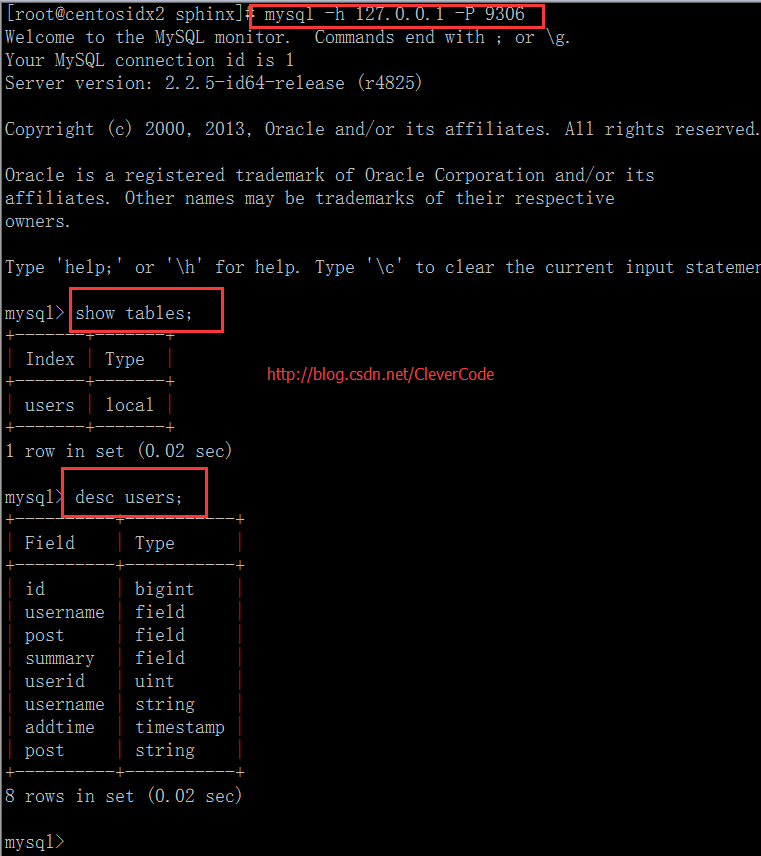
# mysql -h127.0.0.1  -P9306
MySQL [(none)]> show tables;
+-------+-------+
| Index | Type |
+-------+-------+
| users | local |
+-------+-------+
1 row in set (0.00 sec)

MySQL [(none)]>
MySQL [(none)]>
MySQL [(none)]> desc users;
+----------+-----------+
| Field | Type |
+----------+-----------+
| id | bigint |
| username | field |
| post | field |
| summary | field |
| userid | uint |
| username | string |
| addtime | timestamp |
| post | string |
+----------+-----------+
8 rows in set (0.00 sec)
1
2
3
4
5
6
7

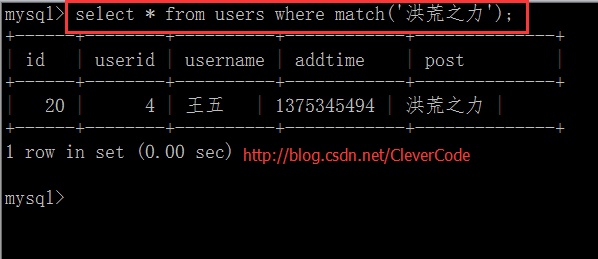
MySQL [(none)]> select * FROM users WHERE match('洪荒之力');
+------+--------+----------+------------+--------------+
| id | userid | username | addtime | post |
+------+--------+----------+------------+--------------+
| 20 | 4 | 王五 | 1375287894 | 洪荒之力 |
+------+--------+----------+------------+--------------+
  • 2,利用php 扩展
1
2
3
4
5
6
7
8
9
10
11
12
13
14
15
16
17
18
19
20
21
22
23
24
25
26
27
28
29
30
31
32
33
34
35
36
37
38
39
40
41
42
43
44
45
46
47
48
49
50
51
52
53
54
55
<?php
header("Content-type: text/html; charset=utf-8");
$b_time = microtime(true);
$key = "洪荒之力";
$index = "users";
//========================================分词

$so = scws_new();
$so->set_charset('utf-8');
//默认词库
$so->add_dict(ini_get('scws.default.fpath') . '/dict.utf8.xdb');
//自定义词库
// $so->add_dict('./dd.txt',SCWS_XDICT_TXT);
//默认规则
$so->set_rule(ini_get('scws.default.fpath') . '/rules.utf8.ini');

//设定分词返回结果时是否去除一些特殊的标点符号
$so->set_ignore(true);

//设定分词返回结果时是否复式分割,如“中国人”返回“中国+人+中国人”三个词。
// 按位异或的 1 | 2 | 4 | 8 分别表示: 短词 | 二元 | 主要单字 | 所有单字
//1,2,4,8 分别对应常量 SCWS_MULTI_SHORT SCWS_MULTI_DUALITY SCWS_MULTI_ZMAIN SCWS_MULTI_ZALL
$so->set_multi(false);

//设定是否将闲散文字自动以二字分词法聚合
$so->set_duality(false);

//设定搜索词
$so->send_text($key);
$words_array = $so->get_result();
$words = "";
foreach($words_array as $v)
{
$words = $words.'|('.$v['word'].')';
}

//加入全词
#$words = '('.$key.')'.$words;
$words = trim($words,'|');
$so->close();
echo '<p>输入:'.$key.'</p>'."\r\n";
echo '<p>分词:'.$words.'</p>'."\r\n";
//========================================搜索
$sc = new SphinxClient();
$sc->SetServer('127.0.0.1',9312);
#$sc->SetMatchMode(SPH_MATCH_ALL);
$sc->SetMatchMode(SPH_MATCH_EXTENDED);
$sc->SetArrayResult(TRUE);
$res = $sc->Query($words,$index);
print_r($res);
$e_time = microtime(true);
$time = $e_time - $b_time;
exit;
?>

结果如下:

1
2
3
4
5
6
7
8
9
10
11
12
13
14
15
16
17
18
19
20
21
22
23
24
25
26
27
28
29
30
31
32
33
34
35
36
37
38
39
40
41
42
43
44
45
46
47
48
49
50
51
52
53
54
55
56
57
58
59
60
61
62
63
64
65
66
67
68
69
70
71
72
73
74
75
76
77
78
79
80
81
82
83
84
85
86
87
88
89
90
91
92
93
94
95
96
97
98
99
100
101
<p>输入:洪荒之力</p>
<p>分词:(洪荒)|(之)|(力)</p>
Array
(
[error] =>
[warning] =>
[status] => 0
[fields] => Array
(
[0] => username
[1] => post
[2] => summary
)

[attrs] => Array
(
[userid] => 1
[username] => 7
[addtime] => 2
[post] => 7
)

[matches] => Array
(
[0] => Array
(
[id] => 20
[weight] => 4500
[attrs] => Array
(
[userid] => 4
[username] => 王五
[addtime] => 1375345494
[post] => 洪荒之力
)

)

[1] => Array
(
[id] => 19
[weight] => 3451
[attrs] => Array
(
[userid] => 3
[username] => 李四
[addtime] => 1438460694
[post] => 洪荒之
)

)

[2] => Array
(
[id] => 18
[weight] => 2436
[attrs] => Array
(
[userid] => 2
[username] => zhangsi
[addtime] => 1408472694
[post] => 中国人
)

)

)

[total] => 3
[total_found] => 3
[time] => 0
[words] => Array
(
[洪] => Array
(
[docs] => 4
[hits] => 4
)

[荒] => Array
(
[docs] => 3
[hits] => 3
)

[之] => Array
(
[docs] => 2
[hits] => 2
)

[力] => Array
(
[docs] => 1
[hits] => 1
)

)

)

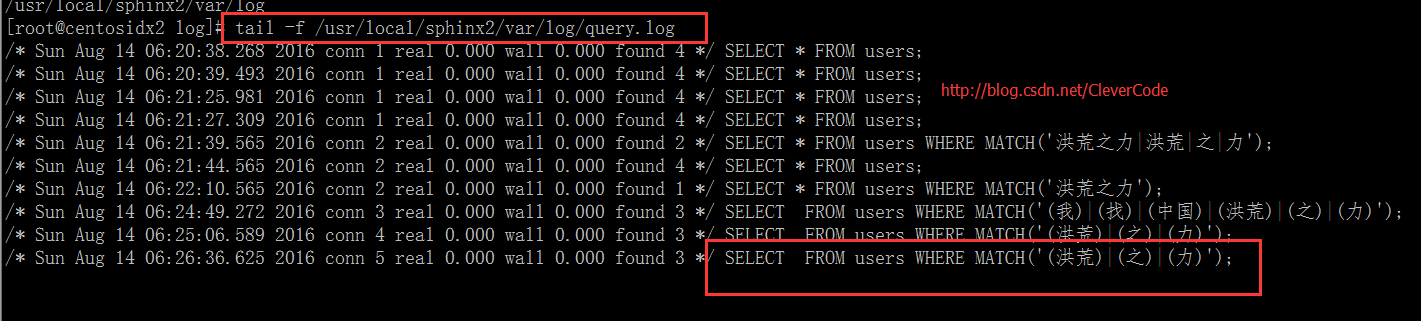
查询query.log

参考:
http://blog.csdn.net/clevercode/article/details/52204124
http://www.cnblogs.com/chenpingzhao/p/4712345.html
http://www.ibm.com/developerworks/cn/opensource/os-sphinx/
http://ourmysql.com/archives/965
http://www.cnblogs.com/yjf512/p/3581869.html
http://blog.51yip.com/mysql/1658.html
转载: http://blog.51yip.com/mysql/1659.html

环境:centos 6.5 x86,php 5.3.3,mysql 5.5.8

一,下载sphinx,scws相关包

sphinx下载地址:http://sphinxsearch.com/downloads/release/

sphinx php扩展下载地址:http://pecl.php.net/package/sphinx

scws下载地址:http://www.xunsearch.com/scws/download.php

scws词库下载地址:http://www.xunsearch.com/scws/down/scws-dict-chs-utf8.tar.bz2

二,安装sphinx,scws,以及php扩展

  • 1,安装sphinx
    1
    2
    3
    4
    # tar zxvf sphinx-2.2.5-release.tar.gz  
    # cd sphinx-2.2.5-release
    # ./configure --prefix=/usr/local/sphinx2 --with-mysql=/usr/local/mysql
    # make && make install
  • 2,安装sphinx客户端
    1
    2
    3
    # cd api/libsphinxclient   //sphinx-2.2.5-release目录下  
    # ./configure --prefix=/usr/local/sphinx2/libsphinxclient
    # make && make install
  • 3,安装sphinx php扩展
1
2
3
4
5
# tar zxvf sphinx-1.3.1.tgz  
# cd sphinx-1.3.1
# phpize
# ./configure --with-sphinx=/usr/local/sphinx2/libsphinxclient --with-php-config=/usr/bin/php-config
# make && make install
  • 4,安装scws
1
2
3
4
5
6
# tar xvjf scws-1.2.2.tar.bz2  
# mkdir /usr/local/scws
# cd scws-1.2.2
# ./configure --prefix=/usr/local/scws/
# make && make install

  • 5,安装scws php扩展
1
2
3
4
5
# cd ./phpext/  
# phpize
# ./configure --with-php-config=/usr/bin/php-config
# make && make install

三,配置sphinx,scws,php等

  • 1,创建测试表和数据
1
2
3
4
5
6
7
8
9
10
11
12
13
14
15
16
17
18
19
20
21
22
23
24
25
26
27
28
29
30
31
32
33
34
35
36
37
38
39
40
41
mysql> desc users;  
+----------+-------------+------+-----+---------+----------------+
| Field | Type | Null | Key | Default | Extra |
+----------+-------------+------+-----+---------+----------------+
| user_id | int(11) | NO | PRI | NULL | auto_increment |
| username | varchar(20) | NO | | NULL | |
+----------+-------------+------+-----+---------+----------------+
2 rows in set (0.00 sec)

mysql> select * from users;
+------------+------------+
| user_id | username |
+------------+------------+
| 1311895262 | 张三 |
| 1311895263 | tank张二 |
| 1311895264 | tank张一 |
| 1311895265 | tank张 |
+------------+------------+
4 rows in set (0.00 sec)
mysql> desc orders;
+--------------+-------------+------+-----+---------+----------------+
| Field | Type | Null | Key | Default | Extra |
+--------------+-------------+------+-----+---------+----------------+
| id | int(11) | NO | PRI | NULL | auto_increment |
| user_id | int(11) | NO | | NULL | |
| create_time | datetime | NO | | NULL | |
| product_name | varchar(20) | NO | | NULL | |
| summary | text | NO | | NULL | |
+--------------+-------------+------+-----+---------+----------------+
5 rows in set (0.00 sec)

mysql> select * from orders;
+----+------------+---------------------+----------------+--------------+
| id | user_id | create_time | product_name | summary |
+----+------------+---------------------+----------------+--------------+
| 9 | 1311895262 | 2014-08-01 00:24:54 | tank is 坦克 | 技术总监 |
| 10 | 1311895263 | 2014-08-01 00:24:54 | tank is 坦克 | 技术经理 |
| 11 | 1311895264 | 2014-08-01 00:24:54 | tank is 坦克 | DNB经理 |
| 12 | 1311895265 | 2014-08-01 00:24:54 | tank is 坦克 | 运维总监 |
+----+------------+---------------------+----------------+--------------+
4 rows in set (0.00 sec)

上面二张表,都是真实的mysql表

  • 2,配置sphinx.conf,加上以下内容
1
2
3
4
5
6
7
8
9
10
11
12
13
14
15
16
17
18
19
20
21
22
23
24
25
26
27
28
29
30
31
32
33
34
35
source myorder  
{
type = mysql
sql_host = localhost
sql_user = root
sql_pass =
sql_db = test
sql_query_pre = SET NAMES utf8
sql_query_pre = SET SESSION query_cache_type=OFF
sql_query = \
SELECT a.id, a.user_id,b.username, UNIX_TIMESTAMP(a.create_time) AS create_time, a.product_name, a.summary \
FROM orders a left join users b on a.user_id = b.user_id
sql_attr_uint = user_id
sql_field_string = username
sql_field_string = product_name
sql_attr_timestamp = create_time

sql_ranged_throttle = 0
#sql_query_info = SELECT * FROM orders WHERE id=$id
}

index myorder
{
source = myorder
path = /usr/local/sphinx2/var/data/myorder
docinfo = extern
mlock = 0
morphology = none
min_word_len = 1
#charset_type = zh_cn.utf-8
html_strip = 1
charset_table = U+FF10..U+FF19->0..9, 0..9, U+FF41..U+FF5A->a..z, U+FF21..U+FF3A->a..z,A..Z->a..z, a..z, U+0149, U+017F, U+0138, U+00DF, U+00FF, U+00C0..U+00D6->U+00E0..U+00F6,U+00E0..U+00F6, U+00D8..U+00DE->U+00F8..U+00FE, U+00F8..U+00FE, U+0100->U+0101, U+0101,U+0102->U+0103, U+0103, U+0104->U+0105, U+0105, U+0106->U+0107, U+0107, U+0108->U+0109,U+0109, U+010A->U+010B, U+010B, U+010C->U+010D, U+010D, U+010E->U+010F, U+010F,U+0110->U+0111, U+0111, U+0112->U+0113, U+0113, U+0114->U+0115, U+0115, U+0116->U+0117,U+0117, U+0118->U+0119, U+0119, U+011A->U+011B, U+011B, U+011C->U+011D, U+011D,U+011E->U+011F, U+011F, U+0130->U+0131, U+0131, U+0132->U+0133, U+0133, U+0134->U+0135,U+0135, U+0136->U+0137, U+0137, U+0139->U+013A, U+013A, U+013B->U+013C, U+013C,U+013D->U+013E, U+013E, U+013F->U+0140, U+0140, U+0141->U+0142, U+0142, U+0143->U+0144,U+0144, U+0145->U+0146, U+0146, U+0147->U+0148, U+0148, U+014A->U+014B, U+014B,U+014C->U+014D, U+014D, U+014E->U+014F, U+014F, U+0150->U+0151, U+0151, U+0152->U+0153,U+0153, U+0154->U+0155, U+0155, U+0156->U+0157, U+0157, U+0158->U+0159, U+0159,U+015A->U+015B, U+015B, U+015C->U+015D, U+015D, U+015E->U+015F, U+015F, U+0160->U+0161,U+0161, U+0162->U+0163, U+0163, U+0164->U+0165, U+0165, U+0166->U+0167, U+0167,U+0168->U+0169, U+0169, U+016A->U+016B, U+016B, U+016C->U+016D, U+016D, U+016E->U+016F,U+016F, U+0170->U+0171, U+0171, U+0172->U+0173, U+0173, U+0174->U+0175, U+0175,U+0176->U+0177, U+0177, U+0178->U+00FF, U+00FF, U+0179->U+017A, U+017A, U+017B->U+017C,U+017C, U+017D->U+017E, U+017E, U+0410..U+042F->U+0430..U+044F, U+0430..U+044F,U+05D0..U+05EA, U+0531..U+0556->U+0561..U+0586, U+0561..U+0587, U+0621..U+063A, U+01B9,U+01BF, U+0640..U+064A, U+0660..U+0669, U+066E, U+066F, U+0671..U+06D3, U+06F0..U+06FF,U+0904..U+0939, U+0958..U+095F, U+0960..U+0963, U+0966..U+096F, U+097B..U+097F,U+0985..U+09B9, U+09CE, U+09DC..U+09E3, U+09E6..U+09EF, U+0A05..U+0A39, U+0A59..U+0A5E,U+0A66..U+0A6F, U+0A85..U+0AB9, U+0AE0..U+0AE3, U+0AE6..U+0AEF, U+0B05..U+0B39,U+0B5C..U+0B61, U+0B66..U+0B6F, U+0B71, U+0B85..U+0BB9, U+0BE6..U+0BF2, U+0C05..U+0C39,U+0C66..U+0C6F, U+0C85..U+0CB9, U+0CDE..U+0CE3, U+0CE6..U+0CEF, U+0D05..U+0D39, U+0D60,U+0D61, U+0D66..U+0D6F, U+0D85..U+0DC6, U+1900..U+1938, U+1946..U+194F, U+A800..U+A805,U+A807..U+A822, U+0386->U+03B1, U+03AC->U+03B1, U+0388->U+03B5, U+03AD->U+03B5,U+0389->U+03B7, U+03AE->U+03B7, U+038A->U+03B9, U+0390->U+03B9, U+03AA->U+03B9,U+03AF->U+03B9, U+03CA->U+03B9, U+038C->U+03BF, U+03CC->U+03BF, U+038E->U+03C5,U+03AB->U+03C5, U+03B0->U+03C5, U+03CB->U+03C5, U+03CD->U+03C5, U+038F->U+03C9,U+03CE->U+03C9, U+03C2->U+03C3, U+0391..U+03A1->U+03B1..U+03C1,U+03A3..U+03A9->U+03C3..U+03C9, U+03B1..U+03C1, U+03C3..U+03C9, U+0E01..U+0E2E,U+0E30..U+0E3A, U+0E40..U+0E45, U+0E47, U+0E50..U+0E59, U+A000..U+A48F, U+4E00..U+9FBF,U+3400..U+4DBF, U+20000..U+2A6DF, U+F900..U+FAFF, U+2F800..U+2FA1F, U+2E80..U+2EFF,U+2F00..U+2FDF, U+3100..U+312F, U+31A0..U+31BF, U+3040..U+309F, U+30A0..U+30FF,U+31F0..U+31FF, U+AC00..U+D7AF, U+1100..U+11FF, U+3130..U+318F, U+A000..U+A48F,U+A490..U+A4CF
ngram_len = 1
ngram_chars = U+4E00..U+9FBF, U+3400..U+4DBF, U+20000..U+2A6DF, U+F900..U+FAFF,U+2F800..U+2FA1F, U+2E80..U+2EFF, U+2F00..U+2FDF, U+3100..U+312F, U+31A0..U+31BF,U+3040..U+309F, U+30A0..U+30FF,U+31F0..U+31FF, U+AC00..U+D7AF, U+1100..U+11FF,U+3130..U+318F, U+A000..U+A48F, U+A490..U+A4CF
}

注意: 新的sphinx,不支持sql_query_info,charset_type设置了,

1
2
WARNING: key 'sql_query_info' was permanently removed from Sphinx configuration. Refer to documentation for details.
WARNING: key 'charset_type' was permanently removed from Sphinx configuration. Refer to documentation for details.
  • 3,安装scws词库
1
2
3
# tar xvjf scws-dict-chs-utf8.tar.bz2 -C /usr/local/scws/etc/  

# chown tank:tank /usr/local/scws/etc/dict.utf8.xdb

在这里一定要加权限,也就是说让php-fpm或者php-cgi的运行用户,拥有dict.utf8.xdb的所有权限。如果不这么做的话,php 扩展调用词库会报如下错误:

1
Warning: SimpleCWS::add_dict(): Failed to add the dict file

怎么查看php-fpm,php-cgi的运行用户呢?

1
2
3
4
5
6
7
8
9
10
11
# ps aux |grep php-fpm  
root 23487 0.0 0.1 284928 4652 ? Ss Nov05 0:00 php-fpm: master process (/etc/php-fpm.conf)
tank 23488 0.0 1.3 336108 52328 ? S Nov05 0:02 php-fpm: pool www //在这里就是tank了
tank 23489 0.0 0.8 310484 34028 ? S Nov05 0:02 php-fpm: pool www
tank 23490 0.0 0.7 306620 30156 ? S Nov05 0:02 php-fpm: pool www
tank 23491 0.0 0.8 310096 33748 ? S Nov05 0:02 php-fpm: pool www
tank 23492 0.0 1.2 331812 47712 ? S Nov05 0:02 php-fpm: pool www
tank 24669 0.0 1.2 333520 48896 ? S Nov05 0:01 php-fpm: pool www
tank 29747 0.0 0.7 305000 27340 ? S 03:27 0:00 php-fpm: pool www
tank 29761 0.0 1.0 320536 39928 ? S 03:27 0:00 php-fpm: pool www
root 30705 0.0 0.0 103260 872 pts/5 S+ 04:11 0:00 grep php-fpm

4,配置php.ini

1
2
3
4
5
6
7
8
# vim /etc/php.ini  
[sphinx]
extension = sphinx.so

[scws]
extension = scws.so
scws.default.charset = utf-8
scws.default.fpath = /usr/local/scws/etc

四,启动sphinx,php-fpm

  • 1,启动sphinx
    1
    2
    # /usr/local/sphinx2/bin/indexer --config /usr/local/sphinx2/etc/sphinx.conf --all  
    # /usr/local/sphinx2/bin/searchd --config /usr/local/sphinx2/etc/sphinx.conf
  • 2,重启php-fpm
    1
    # /etc/init.d/php-fpm restart  
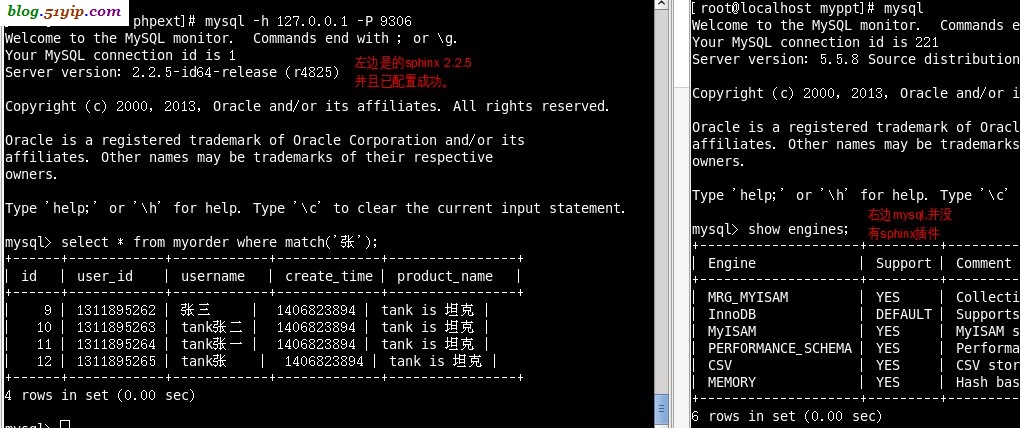
    前二次,我安装sphinx,必须在mysql中安装sphinx存储插件,而这次没有,看下图

五,测试sphinx全文检索

  • 1,命令行的测试
1
2
3
4
5
6
7
8
9
10
11
12
13
14
15
16
17
18
19
20
21
22
23
[root@localhost phpext]# mysql -h 127.0.0.1 -P 9306  
Welcome to the MySQL monitor. Commands end with ; or \g.
Your MySQL connection id is 1
Server version: 2.2.5-id64-release (r4825)

Copyright (c) 2000, 2013, Oracle and/or its affiliates. All rights reserved.

Oracle is a registered trademark of Oracle Corporation and/or its
affiliates. Other names may be trademarks of their respective
owners.

Type 'help;' or '\h' for help. Type '\c' to clear the current input statement.

mysql> select * from myorder where match('张');
+------+------------+------------+-------------+----------------+
| id | user_id | username | create_time | product_name |
+------+------------+------------+-------------+----------------+
| 9 | 1311895262 | 张三 | 1406823894 | tank is 坦克 |
| 10 | 1311895263 | tank张二 | 1406823894 | tank is 坦克 |
| 11 | 1311895264 | tank张一 | 1406823894 | tank is 坦克 |
| 12 | 1311895265 | tank张 | 1406823894 | tank is 坦克 |
+------+------------+------------+-------------+----------------+
4 rows in set (0.00 sec)
  • 2,利用php 扩展
    1
    2
    3
    4
    5
    6
    7
    8
    9
    10
    11
    12
    13
    14
    15
    16
    17
    18
    19
    20
    21
    22
    23
    24
    25
    26
    27
    28
    29
    30
    31
    32
    33
    34
    35
    36
    37
    38
    39
    40
    41
    42
    43
    44
    45
    46
    47
    48
    49
    50
    51
    52
    53
    54
    55
    56
    57
    58
    <?php  
    header("Content-type: text/html; charset=utf-8");
    $b_time = microtime(true);
    echo '<p>'.$b_time.'</p>';
    $key = "张三";
    $index = "myorder";
    //========================================分词

    $so = scws_new();
    $so->set_charset('utf-8');
    //默认词库
    $so->add_dict(ini_get('scws.default.fpath') . '/dict.utf8.xdb');
    //自定义词库
    // $so->add_dict('./dd.txt',SCWS_XDICT_TXT);
    //默认规则
    $so->set_rule(ini_get('scws.default.fpath') . '/rules.utf8.ini');

    //设定分词返回结果时是否去除一些特殊的标点符号
    $so->set_ignore(true);

    //设定分词返回结果时是否复式分割,如“中国人”返回“中国+人+中国人”三个词。
    // 按位异或的 1 | 2 | 4 | 8 分别表示: 短词 | 二元 | 主要单字 | 所有单字
    //1,2,4,8 分别对应常量 SCWS_MULTI_SHORT SCWS_MULTI_DUALITY SCWS_MULTI_ZMAIN SCWS_MULTI_ZALL
    $so->set_multi(false);

    //设定是否将闲散文字自动以二字分词法聚合
    $so->set_duality(false);

    //设定搜索词
    $so->send_text($key);
    $words_array = $so->get_result();
    $words = "";
    foreach($words_array as $v)
    {
    $words = $words.'|('.$v['word'].')';
    }

    //加入全词
    #$words = '('.$key.')'.$words;
    $words = trim($words,'|');
    $so->close();
    echo '<p>输入:'.$key.'</p>';
    echo '<p>分词:'.$words.'</p>';
    //========================================搜索
    $sc = new SphinxClient();
    $sc->SetServer('127.0.0.1',9312);
    #$sc->SetMatchMode(SPH_MATCH_ALL);
    $sc->SetMatchMode(SPH_MATCH_EXTENDED);
    $sc->SetArrayResult(TRUE);
    $res = $sc->Query($words,$index);
    print_r($res);
    $e_time = microtime(true);
    $time = $e_time - $b_time;
    echo '<p>'.$e_time.'</p>';

    echo '<p>'.$time.'</p>';
    exit;
    ?>
    结果如下:
1
2
3
4
5
6
7
8
9
10
11
12
13
14
15
16
17
18
19
20
21
22
23
24
25
26
27
28
29
30
31
32
33
34
35
36
37
38
39
40
41
42
43
44
45
46
47
48
49
50
51
52
53
54
55
56
57
58
59
<p>1415214126.9106</p><p>输入:张三</p><p>分词:(张三)</p>Array  
(
[error] =>
[warning] =>
[status] => 0
[fields] => Array
(
[0] => username
[1] => product_name
[2] => summary
)

[attrs] => Array
(
[user_id] => 1
[username] => 7
[create_time] => 2
[product_name] => 7
)

[matches] => Array
(
[0] => Array
(
[id] => 9
[weight] => 2500
[attrs] => Array
(
[user_id] => 1311895262
[username] => 张三
[create_time] => 1406823894
[product_name] => tank is 坦克
)

)

)

[total] => 1
[total_found] => 1
[time] => 0
[words] => Array
(
[张] => Array
(
[docs] => 4
[hits] => 4
)

[三] => Array
(
[docs] => 1
[hits] => 1
)

)

)
<p>1415214126.9516</p><p>0.041085958480835</p>

1、meta标签实现 只需在head里加上下面这一句就行了,在当前页面停留0.1秒后跳转到目标页面

1
<meta http-equiv="refresh" content="0.1; url=http://baidu.cn/">

2、Javascript实现

  • 方法一:这个方法比较常用

    1
    window.location.href = "http://baidu.cn/";
  • 方法二:

    1
    self.location = "http://baidu.cn/";
  • 方法三:

    1
    top.location = "http://baidu.cn/";
  • 方法四:
    只对IE系列浏览器有效,实用性不大

    1
    window.navigate("http://baidu.cn/");

3、php实现

1
2
3
<?php
header("Location: http://baidu.cn/");
?>

nginx维护页面处理-全部URL指向同一个页面
一般来说nginx的维护页面需要把所有访问本站的链接全部重定向到某个指定页面

1.rewrite

1
rewrite ^(.*)$ /maintain.html break;

注意这句后面如果有重定向等语句,那么后面执行的重定向等语句需要全部注释掉

2.使用状态码

1
2
3
4
5
location /{
return 503;
}
#注意其他location优先级高的匹配均需要注释掉
error_page 503 /maintain.html;

每当服务器遇到 502 代码时,就自动转到临时维护的静态页:

1
2
3
4
5
6
7
8
9
10
11
12
13
14
server {
listen 80;
server_name mydomain.com;

# ... 省略掉 N 行代码


error_page 502 = @tempdown;

location @tempdown {
rewrite ^(.*)$ /pages/maintain.html break;
}
}

如果你只想要【临时维护页面】就这样写(适合服务器更新东西或者改版):

1
2
3
4
5
6
7
8
9
10
server {
listen 80;
server_name mydomain.com;

# ... 省略掉 N 行代码

# 所有页面都转跳到维护页
rewrite ^(.*)$ /pages/maintain.html break;

}

* 注:*
* 临时维护页要找对正确的路径,我的例子是 http://mydomain.com/page/maintain.html。所以路径是 /page/maintain.html *

STEP1

A1.1是新文件夹,A1.0是旧文件夹,out是放置 A1.0到A1.1的保持目录结构的增量文件。

1
rsync --dry-run -rcnC --out-format="%n"  A1.1/  A1.0/

注意该处的-C参数是按照cvs的ignore规则来过滤不需要同步的文件,在CVS中,默认是不会提交二进制文件的,所以如果需要进行二进制文件提取,那就不要加C.
执行了该命令后,得到了一个A1目录的文件列表:

1
2
3
4
A1.1/system/app/
A1.1/system/app/A.apk
A1.1/system/app/B.apk
A1.1/system/app/C.apk

也就是差异文件,由于这里默认会显示出文件夹,所以要过滤掉以『/』结尾的文件夹的显示

1
rsync --dry-run -rcnC --out-format="%n"  A1.1/  A1.0/ |grep -v "/$"

这样就得到了一个纯增量文件的列表

STEP2

有了文件列表,复制的操作方法就很多了。可以继续使用rsync同步到新的out目录,以防止多次执行后错误文件修复问题
完整代码

1
rsync --dry-run -rcnC --out-format="%n"  A1.1/  A1.0/ |grep -v "/$"|xargs -I{} rsync -R A1/./{} out/

来源: [https://www.vpsee.com/2013/08/how-to-fix-mysql-table-is-marked-as-crashed-and-should-be-repaird/]

昨天一位 VPS 客户说他的 WordPress 博客没了,网站可以打开,但是文章都没了,怀疑被黑。我们登陆客户 VPS 后没发现被黑迹象,然后进入 MySQL 数据库发现 Table ‘./wordpress/wp_posts’ is marked as crashed and should be repaired 错误,因为 wp_posts 表被损坏了,所以 WordPress 的文章都显示不出来:

1
2
3
4
5
6
7
8
9
10
11
mysql -u root -p
Enter password:

mysql> use wordpress;
Reading table information for completion of table and column names
You can turn off this feature to get a quicker startup with -A

Database changed
mysql> select * from wp_posts;
ERROR 145 (HY000): Table './wordpress/wp_posts' is marked as crashed and should be repaired
mysql> Bye

修复 MySQL 数据库数据表问题可以由 mysqlcheck 来解决,先用 mysqlcheck 查看一下:

1
2
# mysqlcheck -u root -p wordpress
Enter password:

然后添加 –auto-repair 参数自动修复,最好修复前备份一下数据库:

1
2
3
4
5
6
7
8
9
10
11
12
13
14
15
16
17
18
19
20
21
22
23
24
25
26
27
28
29
30
31
32
33
34
35
36
37
38
# mysqldump -u root -p wordpress > wordpress.sql
Enter password:

# mysqlcheck -u root -p wordpress --auto-repair
Enter password:
wordpress.wp_commentmeta
error : Table upgrade required. Please do "REPAIR TABLE `wp_commentmeta`" or dump/reload to fix it!
wordpress.wp_comments
error : Table upgrade required. Please do "REPAIR TABLE `wp_comments`" or dump/reload to fix it!
wordpress.wp_links
error : Table upgrade required. Please do "REPAIR TABLE `wp_links`" or dump/reload to fix it!
wordpress.wp_options
error : Table upgrade required. Please do "REPAIR TABLE `wp_options`" or dump/reload to fix it!
wordpress.wp_postmeta
error : Table upgrade required. Please do "REPAIR TABLE `wp_postmeta`" or dump/reload to fix it!
wordpress.wp_posts
error : Table upgrade required. Please do "REPAIR TABLE `wp_posts`" or dump/reload to fix it!
wordpress.wp_term_relationships OK
wordpress.wp_term_taxonomy
error : Table upgrade required. Please do "REPAIR TABLE `wp_term_taxonomy`" or dump/reload to fix it!
wordpress.wp_terms
error : Table upgrade required. Please do "REPAIR TABLE `wp_terms`" or dump/reload to fix it!
wordpress.wp_usermeta
error : Table upgrade required. Please do "REPAIR TABLE `wp_usermeta`" or dump/reload to fix it!
wordpress.wp_users
error : Table upgrade required. Please do "REPAIR TABLE `wp_users`" or dump/reload to fix it!

Repairing tables
wordpress.wp_commentmeta OK
wordpress.wp_comments OK
wordpress.wp_links OK
wordpress.wp_options OK
wordpress.wp_postmeta OK
wordpress.wp_posts OK
wordpress.wp_term_taxonomy OK
wordpress.wp_terms OK
wordpress.wp_usermeta OK
wordpress.wp_users

基本情况

1
2
3
4
5
6
7
8
9
10
11
12
13
[root@test ~]# cat /etc/redhat-release
CentOS release 6.5 (Final)
[root@test ~]# uname -a
Linux test 2.6.32-431.el6.x86_64 #1 SMP Fri Nov 22 03:15:09 UTC 2013 x86_64 x86_64 x86_64 GNU/Linux
[root@test ~]# file /bin/wipefs
/bin/wipefs: ELF 64-bit LSB executable, x86-64, version 1 (SYSV), statically linked, stripped
[root@test ~]# ll /bin/wipefs
-rwxr-xr-x 1 root root 2384177 Jul 18 2013 /bin/wipefs
[root@monitor ~]# lsattr /bin/wipefs
----i--------e- /bin/wipefs
[root@monitor ~]# lsattr /bin/ddus-uidgen
----i--------e- /bin/ddus-uidgen

改动了dns配置

1
2
3
4
5
6
7
8
9
10
11
12
13
[root@test rc3.d]# stat /etc/resolv.conf
File: `/etc/resolv.conf'
Size: 106 Blocks: 8 IO Block: 4096 regular file
Device: 802h/2050d Inode: 1182160 Links: 1
Access: (0644/-rw-r--r--) Uid: ( 0/ root) Gid: ( 0/ root)
Access: 2017-11-22 06:00:02.797144215 +0800
Modify: 2017-11-22 06:00:02.795144215 +0800
Change: 2017-11-22 06:00:02.795144215 +0800
[root@test rc3.d]# cat /etc/resolv.conf
nameserver 208.67.222.222 #加拿大DNS
nameserver 114.114.114.114
nameserver 208.67.222.222
nameserver 114.114.114.114

增加了开机启动

1
2
3
4
5
6
7
8
9
10
11
12
13
14
15
16
17
18
19
20
21
22
23
24
[root@test cron]# ll /etc/init.d/wipefs
lrwxrwxrwx 1 root root 11 Nov 22 06:00 /etc/init.d/wipefs -> /bin/wipefs
[root@test rc3.d]# pwd
/etc/rc.d/rc3.d
[root@test rc3.d]# ll -h |grep wipefs
lrwxrwxrwx 1 root root 18 Nov 22 06:00 S01wipefs -> /etc/init.d/wipefs
[root@test rc3.d]# cd /etc/rc3.d/
[root@test rc3.d]# ll -h |grep wipefs
lrwxrwxrwx 1 root root 18 Nov 22 06:00 S01wipefs -> /etc/init.d/wipefs
[root@test init.d]# pwd
/etc/init.d
[root@test init.d]# ll acpidtd
-rwxr-xr-x 1 root root 1223753 Nov 20 16:03 acpidtd
[root@test rc3.d]# ll -h |grep acpidtd
lrwxrwxrwx 1 root root 19 Nov 20 16:03 S01acpidtd -> /etc/init.d/acpidtd
[root@test rc3.d]# pwd
/etc/rc3.d
[root@test rc3.d]# cd /etc/rc.d/rc3.d/
[root@test rc3.d]# ll -h |grep acpidtd
lrwxrwxrwx 1 root root 19 Nov 20 16:03 S01acpidtd -> /etc/init.d/acpidtd
[root@test rc3.d]# ll /bin/ddus-uidgen
-rwxr-xr-x 1 root root 1223753 Nov 20 16:03 /bin/ddus-uidgen
[root@test rc3.d]# ll /etc/resolv.conf
-rw-r--r-- 1 root root 106 Nov 22 06:00 /etc/resolv.conf

清理

1
2
3
4
5
6
7
8
9
10
11
12
13
14
15
16
17
18
19
20
21
22
23
24
25
26
27
28
29
30
31
32
33
34
35
36
37
pkill wipefs
echo "nameserver 114.114.114.114" > /etc/resolv.conf
chattr -i /bin/wipefs
chattr -i /bin/ddus-uidgen
chattr -i /etc/init.d/acpidtd
rm -rf /bin/wipefs
rm -rf /etc/init.d/wipefs
rm -rf /bin/ddus-uidgen
rm -rf /etc/init.d/acpidtd
rm -rf /etc/rc0.d/S01wipefs
rm -rf /etc/rc1.d/S01wipefs
rm -rf /etc/rc2.d/S01wipefs
rm -rf /etc/rc3.d/S01wipefs
rm -rf /etc/rc4.d/S01wipefs
rm -rf /etc/rc5.d/S01wipefs
rm -rf /etc/rc6.d/S01wipefs
rm -rf /etc/rc.d/rc0.d/S01wipefs
rm -rf /etc/rc.d/rc1.d/S01wipefs
rm -rf /etc/rc.d/rc2.d/S01wipefs
rm -rf /etc/rc.d/rc3.d/S01wipefs
rm -rf /etc/rc.d/rc4.d/S01wipefs
rm -rf /etc/rc.d/rc5.d/S01wipefs
rm -rf /etc/rc.d/rc6.d/S01wipefs
rm -rf /etc/rc0.d/acpidtd
rm -rf /etc/rc1.d/acpidtd
rm -rf /etc/rc2.d/acpidtd
rm -rf /etc/rc3.d/acpidtd
rm -rf /etc/rc4.d/acpidtd
rm -rf /etc/rc5.d/acpidtd
rm -rf /etc/rc6.d/acpidtd
rm -rf /etc/rc.d/rc0.d/acpidtd
rm -rf /etc/rc.d/rc1.d/acpidtd
rm -rf /etc/rc.d/rc2.d/acpidtd
rm -rf /etc/rc.d/rc3.d/acpidtd
rm -rf /etc/rc.d/rc4.d/acpidtd
rm -rf /etc/rc.d/rc5.d/acpidtd
rm -rf /etc/rc.d/rc6.d/acpidtd

I have noticed that even if you do a fsck on the disk the problem may occur again in a few days.

I have found that the problem is worse on SSD disks than the regular HDD disks. I have found some steps that may fix the problem temporarily.

fsck -fy /dev/sda1

if sda1 is the right partition - the prompt will tell you exactly which one requires fsck.

After that if the systems boots up you may have another problem with the package management system, so if you open a terminal and type sudo apt-get update you may get an error. Do not worry. Run these commands:

1
2
3
4
sudo apt-get update
sudo apt-get clean
sudo apt-get update
sudo apt-get upgrade

My opinion is that there is serious problem in Ubuntu with regard to SSD disks. The community should fix it.

I have found a possible cause of this problem: Probably the system did not shutdown normally.

setup NFS but when trying to mount getting the following errors

mount.nfs: access denied by server while mounting <server ip>:/exports

The

showmount -e <server ip>

command returns the following

/exports <client ip>

操作系统安装时选择了中文字符,导致命令行下的错误提示信息也显示中文。这样无法在google上搜索到相对应的解决方法。所以需要临时修改提示信息为英文
#export LANG=”en_US.UTF-8”